SpringBoot注解
RestController
@Controller 处理 Http 请求
@RestController spring4 新加注解,就是@ResponseBody与@Controller的结合,返回 Json
默认没有@Controller 的模板,要引入 thymeleaf,然后 templates 里放
RequestParam PathVariable
@RequestParam获取参数
    @RequestMapping(value = "/hello",method = RequestMethod.GET)
    public String Hello3(@RequestParam(value = "id",defaultValue = "-1") Integer id){
        System.out.println(id);
        return String.valueOf(id);
    }
http://localhost:8080/hello?id=444
@PathVariable 获取 Url 中的数据
    @RequestMapping(value = "/hello/{id}",method = RequestMethod.GET)
    public String Hello2(@PathVariable(value = "id")Integer id){
        System.out.println(id);
        return String.valueOf(id);
    }
RequesetMapping的简化
@RequestMapping(value = "/hello",method = RequestMethod.GET) 替换为 @GetMapping(value = "/hello")
类似的:
@PostMapping
@PutMapping
@DeleteMapping
SpringBootApplication 关键
用过SpringBoot的朋友都知道,我们必须写一个启动类
@SpringBootApplication
public class SpringbootDemoApplication {
    public static void main(String[] args) {
        SpringApplication.run(SpringbootDemoApplication.class, args);
    }
}
而SpringBoot有一个不成文的规定:
所有的组件必须在启动类所在包及其子包下,出了这个范围,组件就无效了。
为什么会有这个规定呢?
我们来看一下启动类上唯一的注解@SpringBootApplication,发现它其实是一个组合注解:
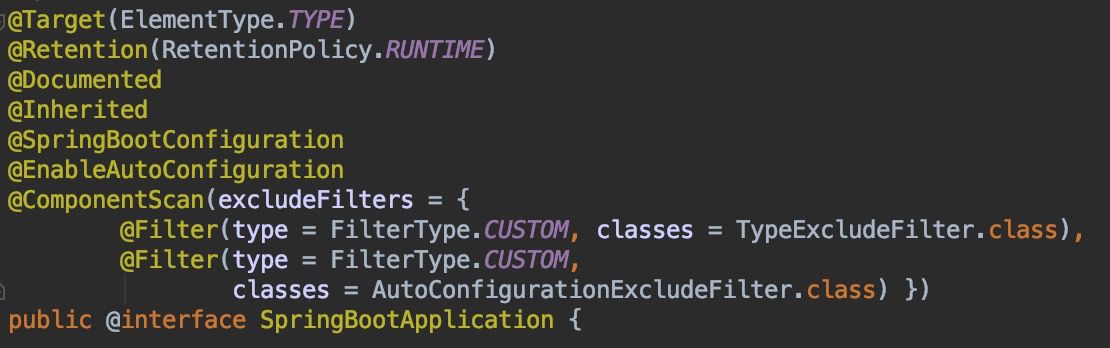
@ComponentScan没有指定basePackages属性,也就是没有指定扫描路径。那么,按照上面的分析,默认扫描当前包及其子包下组件。
这就是上面不成文规定的背后原因。
EnableAutoConfiguration
这是注解SpringBootApplication里包含的。
当使用 @SpringBootApplication 时,@EnableAutoConfiguration 是自动启用的。
作用:启用 Spring 应用程序上下文的自动配置,尝试猜测并配置您可能需要的bean。自动配置类通常根据您的 classpath 和您已经定义的bean来实现。例如,如果您的 classpath 中有 tomcat-embedded.jar,则可能需要一个TomcatEmbeddedServletContainerFactory(除非您已经定义了自己的 EmbeddedServletContainerFactory bean)。
自动配置尝试尽可能的智能化,并在当您定义更多的自己的配置时回退。您可以随时手动 exclude() 任何您不想应用的配置(如果您不能访问他们,请使用 excludeName())。您也可以通过 spring.autoconfigure.exclude 属性排除它们。自动配置总是在用户定义的 bean 注册之后实施。
用 @EnableAutoConfiguration 注解的类的 package 具有特定的意义,通常用作“默认”。例如,它将在扫描 @Entity 类时使用。通常建议您将 @EnableAutoConfiguration 放在 root package 中,以便可以搜索所有子 package 和类。
Value 注解
使用@Value注解,可以直接将属性值注入到beans中。
注: 详细资料见 24. Externalized Configuration 或者 中文翻译 外化配置
@Component
public class MyBean {
    @Value("${name}")
    private String name;
    // ...
}